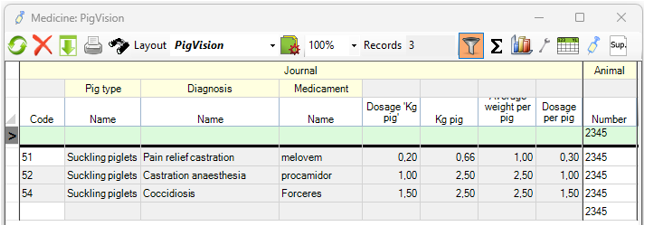
After setting up the combi treatments in PigVision, your registration has become more effective, as you don't manually have to do the 2nd and 3rd registration anymore. Now you start using the connected journal(s) by just doing a treatment or using a work list for the registration. In the overview of all the treatments you experience that the 2nd and 3rd didn't save.
Often the reason is, that it is the wrong code for the journal which is used, when registering the treatments.
In this article the treatments for castration are used as an example, where the three diagnosis "pain relief castration", "castration anaesthesia" and "coccidiosis" are connected to be a combi treatment.
Notice which journal code you registered when you expected to do the combi treatment registration.
Go to "General" - "Medicine/vaccination" - "Journal" and look for the journal, where the second and maybe third treatment is connected.
As displayed in the example below, code 51 is the journal the second and third treatment is connected to.
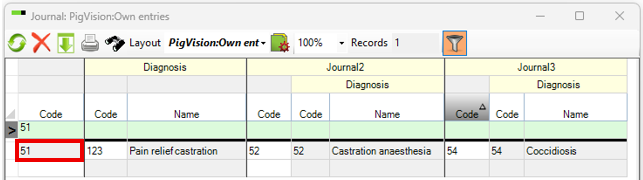
If you have registered the treatment on journal 52 or 54, the combi treatment will not be registered.
When the combi treatment is registered correctly on the right journal number, the two additional treatments is displayed in grey in the treatment window.