
In version 2026.2 of PigVision and version 12.7 of PigVision Mobile Sows, both released on 2/7-2026 the following features have been implemented:
PigVision
- Functionality to export data to Big Dutchman via IsoAgriNet file
You can find the export function under: "General", "Administration", "Export". Chose "Big Dutchman" to do the export.
The events added to the export file are:
- tag (sow number)
- RFID (LF)
- arrival date
- birth date
- sex
- date of insemination
- date of farrowing
- date of weaning
- Piglets born alive
- litter number
The data exchange only goes one way: Export from PigVision, import into Big Dutchman ESF.
- Bug fixed preventing a Topigs Norsvin EDI file with same number, but different date interval, to be sent twice via WEB
The numbering of the EDI files for Topigs is now done by a safer routine making sure, that when a new EDI file is accepted by Pigbase, the number of the next file is set immediately.
You can find the data exchange for Topigs Norsvin in PigVision under: "Breeding", Communication", "EDI pigs"
- New index, litter gain, added to the DanBred Index import
You can download the indexes in PigVision under Breeding", "Communication", "Download from DanBred".
The new sub index will be shown ie.in the "Breeding progeny" list in the column "Litter gain". If you don't see the index column, you can find an article about adding columns to a layout here: Add or remove columns from a layout : PigVision | Customer Service Portal
- Addition of exit codes for hernia sent in the data exchange with DanBred
If exit code 77 and 78 is registered on an animal exit, the code will be sent in the data exchange to DanBred. You need to create the exit codes in the "Cause" setup. You can find information on how to set up a "Cause" in this article: Set up codes for death and causes : PigVision | Customer Service Portal.
- Implementing free choice of key figures for the "Key figures section" of the sow card
The general key figures section on the sow card has now been expanded and give users the possibility to choose any of the key figures included in the formula collection connected to "Sow Card". In the FAQ: Can I change the print layout for my sow card? : PigVision | Customer Service Portal.
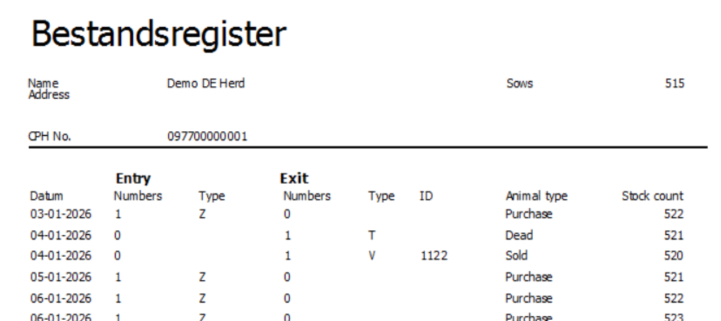
- Implemented inventory report that complies with “Bestandsregister Schweine “ in Germany
The “Bestandsregister” can be printed as documentation for German authorities
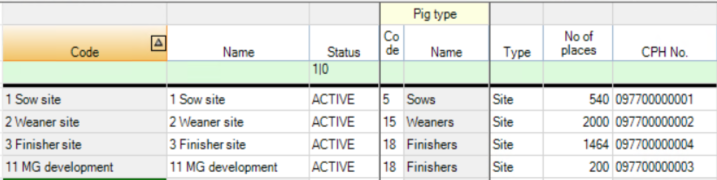
You find the "Bestandsregister" under the menu Management in PigVision. You have to have a German setup in PigVision and the farm has to have a VVVO number and so do sites within the farm.
Here an example:
And an example of a report:
PigVision Mobile Sows
- Implementing a HEX to EPC converter for HF electronic ear tags
A HEX to EPC number converter for HF electronic ear tags has been implemented in the App. This means, that the MBDC All in One (HF) scanner also now can read the Tag after it has been assigned to an animal.
- Fixed a BUG where opening animal card was not possible
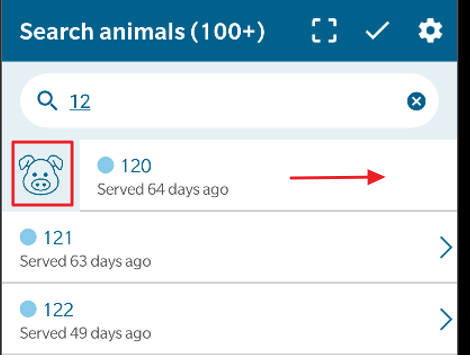
Fixed a BUG where opening the animal card in the was not possible for iOS ver. 11 and higher. You can open the animal card, by swiping right on an animal number, and then tapping on the pig icon as shown below.
- Added functionality to register "From location" at sow entry
On sow entry, it is now possible to enter the location where the animal came from.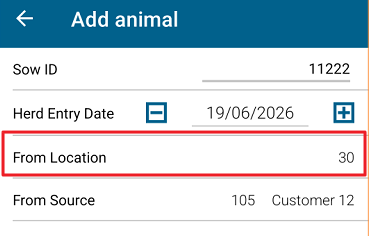
- Optimized the program code, preventing animals from disappearing in the app under synchronization
Some users have experienced that animals suddenly disappears in the App, and then had to delete and restore the data in the app.
The code has now been optimized, preventing animals from disappearing from the App.