
When working with batches you can work with both a batch ID and a location in combination or just with batch ID.
The difference between a batch and a location is that a batch is random locations that are identified by the user to be holding a specific group of animals, whereas the location is a physical place, that being a pen, section, barn or site.
Under "General" - "Setup" you can set your batch recording.
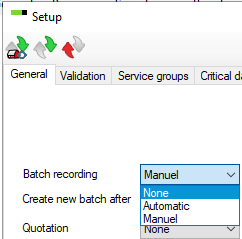
There are three different choices:
- None: Select this option if batches are not used.
- Automatic: Connect batch numbers to locations. When a registration is made for a location, the program will automatically know which batch the animal belongs to.
- Manuel: A batch is not necessarily connected to a specific location. When you make a registration under "Progeny", you have to register a location as well as the batch number.
Create new batch after: Choose when new batches are created automatically. In the dropdown you can choose between 1 week and up to 10 weeks.
If you select 6 weeks, entries within 6 weeks will be in the same batch, while entries after the 6 weeks will be in a new batch. This is useful for herds with manual batch recording with AgroVision key set to download Spf-data automatically.