
Currently, the PigVision Growers app is not available in the Play Store for Android phones that have an Android version above 13. The app is only available for phones with an Android version up to and including 13.
However, you can install the Growers App as an .APK that allows the PigVision Growers app to be installed on phones (and other devices) that have an Android version newer than 13.
Follow the guide below to install PigVision Growers, which is not available on Play store:
- If you have PigVision Mobile Growers installed on your mobile, then it has to be uninstalled before moving to the next steps.
- Open a browser on your phone (Google, Chrome, or other).
- In the browser, type "www.winopti.com/PVMGrowers.apk".
- Press enter/search and the APK will download (if the download stops, simply try to download it again).
- You may get a warning that the download is not safe. Here, you need to make sure that the download keeps running by allowing it to continue.
- When the download is done, you can find PVMGrowers.apk in the "Download" or "APK" folder on your mobile device.
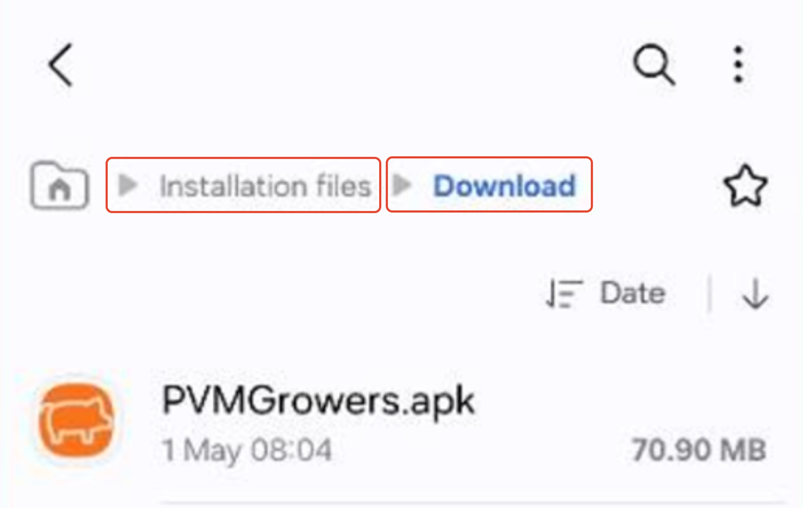
- Tap on the file PVMGrowers.apk and the PigVision Growers app will be installed.
- During installation, you may be asked if you want to allow the app to be installed. Make sure to press "Yes" or "Accept" for this.
- You may get a message if you want to scan the app. You can press "Yes" or "No" - either way the app will be downloadet.
- Once the installation is complete, you can open the app and enter your username and password.