
This report compiles all treatments registered in PigVision and shows the total consumption of a specific medication.
In the report, you can also see how many animals have been treated under the relevant record, how much has been registered as waste, and the theoretical remaining amount of the medication, which is based on how much has been prescribed and used.
Go to “Report” - “Medicine usage”.
The Medicine usage window will look like this per default:
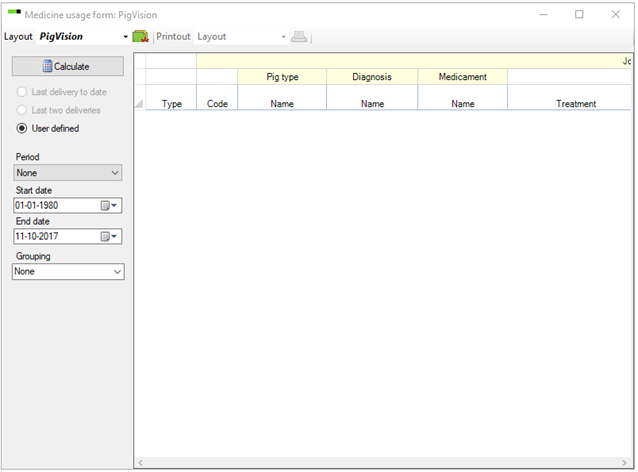
- Calculate: When you have selected the period, click “Calculate” to calculate the report.
- Period: Select which period to view medicine usage for.
- With “Last delivery to date” and “Last two deliveries” the program will use the registrations made at “General entries” – “Medicine delivery”.
- If you select “User defined” you may select between different periods in the dropdown box.
- If you select “None” you may choose a start and end date and thus view the usage between two specific dates.
The example below shows medicine usage since the last delivery. The example shows the part of the report that concerns journal information.
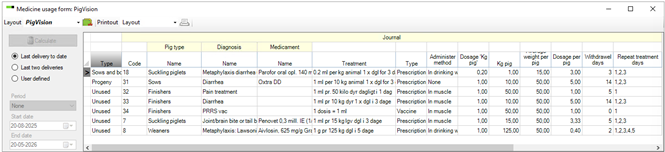
If a journal has not been used within the period, the type will say “Unused”.
In each column you can view the pig type, diagnosis, and medication connected to the journal. You can also view the treatment, type (prescription or vaccine), and method of administration.
You can view the dosage, whether or not there are any containment days as well as repeat treatment (if applicable).
The example below shows the part of the report that concerns the usage of the individual journals.
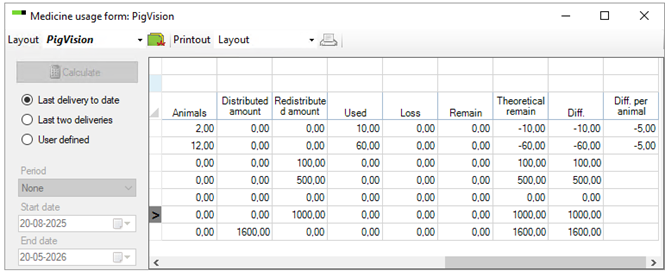
- Animals: The number of animals treated with the specific journal
- Distributed amount: Journal-deliveries for the period (if registered at “General entries” – “Medicine delivery”)
- Redistributed amount: How much medication is left after a vet visits in the period (if registered under “General entries” – “Medicine delivery” or "Vet Visits", which is described here.)
- Used: How much medicine has been used in the period
- Loss: Medicine loss as registered at “General entries” – “Medicine loss”
- Remain: If the period ends on the date of a registered “Medicine delivery” and a redistributed amount has been registered, it is shown as “Remain” and will be “transferred” to the next period
- Theoretical remain: The amount of medicine that theoretically should be left for the journal. This is calculated from Distributed amount, Redistributed amount, Used, and Loss.
- Diff.: The difference between distributed, redistributed, usage, loss, and remain. The difference is only shown for the period that the analysis matches the dates to for “Medicine delivery”
- Diff. per animal: The difference per treated animal
If there is a difference, you should check the medicine data. If a bottle of medicine has been dropped but not entered as a loss, it will create a difference.
You can use “Layout setup” to add additional registration columns. It is recommended to set up your own layout which is described here.