
You can create your DanBred breeding animals manually in PigVision if you do not import a delivery note for gilts or register your own offspring. This can be done in two ways.
1. In PigVision go to “Breeding” - "Progeny".
Please enter ID number, birth date, breed code, sex herd number + date and entry date. If your layout does not look like below, the columns can easily be added via "Layout setup".
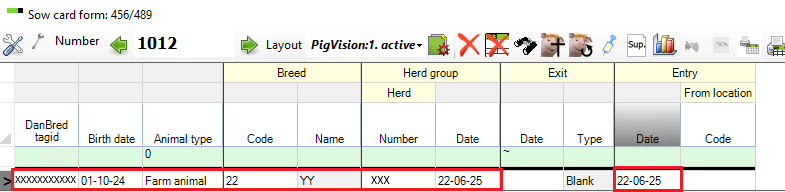
Then go to "Sows/Boars" - “Entry” - "PigVision" - "Entry" and enter the ID number of the animal and the remaining information.
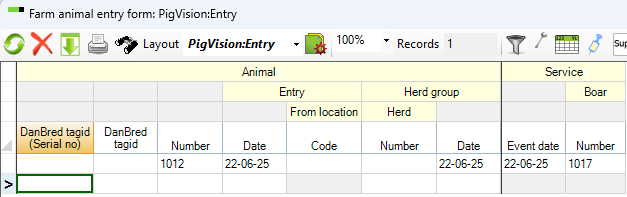
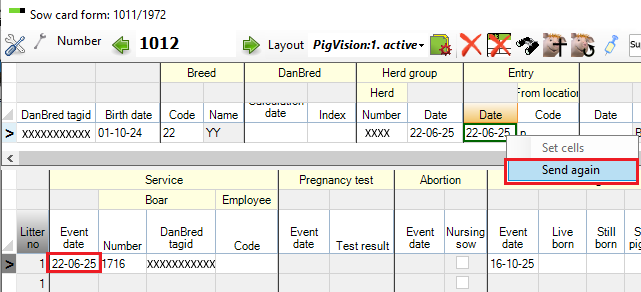
The next time data is sent to DanBred, the Databank will be updated.
2. Go to "Sows/Boars" - "Sow card".
Enter the sow number in the top left corner and press Enter. If the number is not already in use, you will see this message.
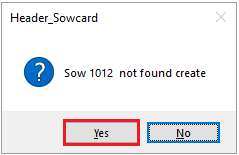
If you want to create a new sow card you can press "Yes".
The sow card is then created.
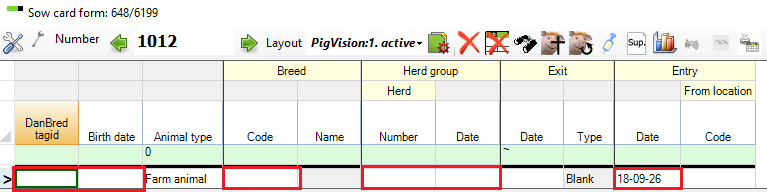
Here, the ID number, date of birth, breed code, herd number + date and entry date are entered. If your layout does not look like below, the columns can easily be added via "Layout setup".
Once the information has been entered, click the "Update breeding data" icon.

The data on the sow will then be updated.