
If you use the same username and password, you may risk disconnecting a colleague. Instead you can log in using a different set of credentials.
Instead of clicking the RDP icon, you can right-click it and select "Edit". If you are using Windows 11, you will have to choose Show more options and then Edit:
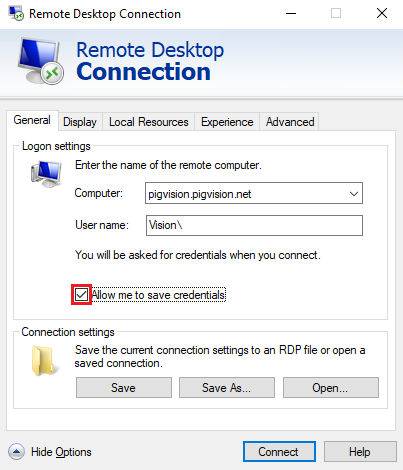
Check the "Always ask for credentials" box and click "Connect".
The following will open:
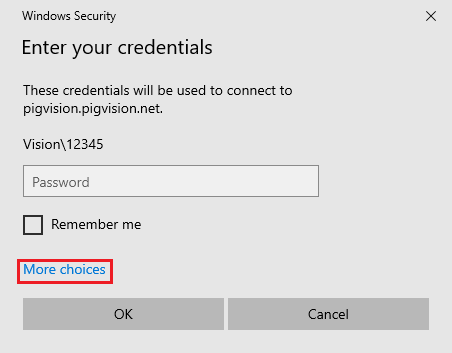
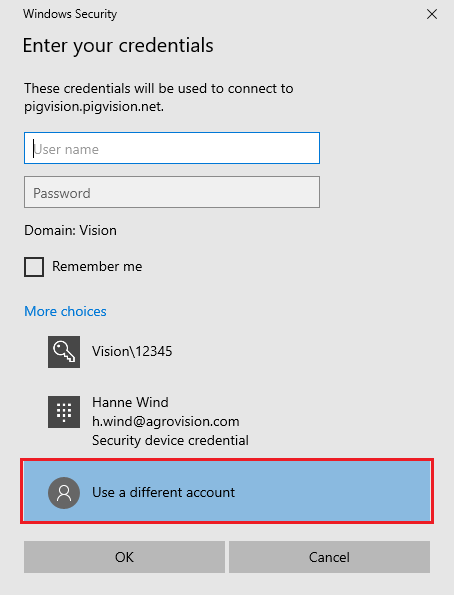
Click "More choices" and then select "Use a different account".
You will now be prompted to enter a username and password.
To avoid being prompted for a password every time you log in, you can clear the checkbox again once you are able to use the original credentials.
Alternatively, after tight-clicking the icon, you can remove the username.
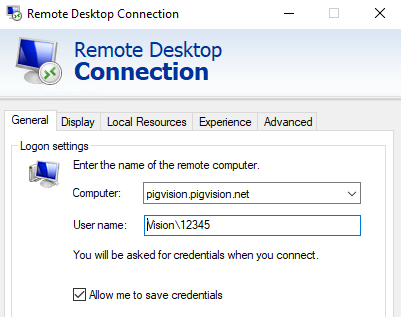
If you would loke to continue signing in with the alternative username and password, you can have the programme save these credentials and clear the checkbox. This will ensure that you always log in using the alternative username and password.
Remember to click "Save" if you want the setting to be retained.