
In PigVision there are multiple ways of registering an exit or removal.
- In "Sows/boars" - "Removal" you can register all removals/exits of all types of breeding stock from the herd. Register the removal date, exit type and exit cause. Note that it is not possible to view all previously registered removals in this window.
- In "Sows/boars" - "Sow card" - in the column ""Exit" you can add the date, exit type and exit cause.
- In "Sows/boars" - "Animals" - "PigVision" - "Removed animals" - in this list you find all the exited animals in the farm. In the bottom of the list, you can remove the new animal.
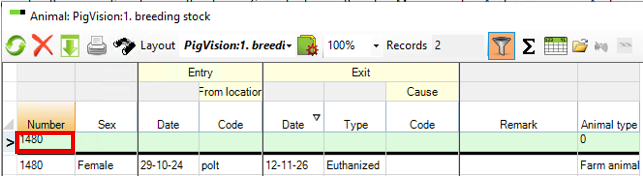
- In "Sows/boars" - "Animals" - "PigVision" - "Breeding stock" - find the animal that needs to exit e.g. by searching on the animal number in the green line under "Number" - add the exit date, exit type and cause.
When you want to remove a sow by entering an exit date there are a few rules which must be observed:
- If it is a lactating sow with piglets she must be weaned before you can enter the exit or use transferred piglets column to remove any currently nursing piglets so she has zero pigs on her.
- If the setting is that you must enter a weight on weanings, it also applies if you enter 0 weaned piglets. If the sow should be weaned with 0 piglets, you must actively enter 0 in the number of piglets and 0 in the weight
- You can transfer the piglets or register them as dead.
- The exit date must be equal to or after last event on the animal. Ex.: If a sow is transferred from one location to another or if she has been given medication. Then the exit date must be after or on the same date as these events.